Features and Limitations of Scite Assistant and Scite MCP
— by River Mi
Following our previous blog post on Scite Dashboard, this post will further introduce 1) Scite Assistant, an AI function aiming to help users discover, synthesize, and verify the research literature, and 2) Scite MCP, a server enabling users to directly access Scite’s literature search and “Smart Citations” from within AI tools like ChatGPT and Claude. The University of Hong Kong Libraries subscribes to Scite. In this article, we use recent trends in open science as an example.
1: Interact with Assistant
Scite Assistant is a conversational tool which aims to retrieve contents when receiving simple language prompts. Its responses are grounded in Scite’s data, covering 2.8 billion citations, and 306.3 million works, among which 41.2 million are full-texts (Scite Data and Services, 2026).
To interact with Scite Assistant, users ask questions in the text box. From May 2026, they can also upload a PDF or document directly to Assistant and ask questions against it (May 2026 Release Notes, 2026). Assistant can also generate summaries for those articles when users enter a list of DOIs (March 2026 Release Notes, 2026).
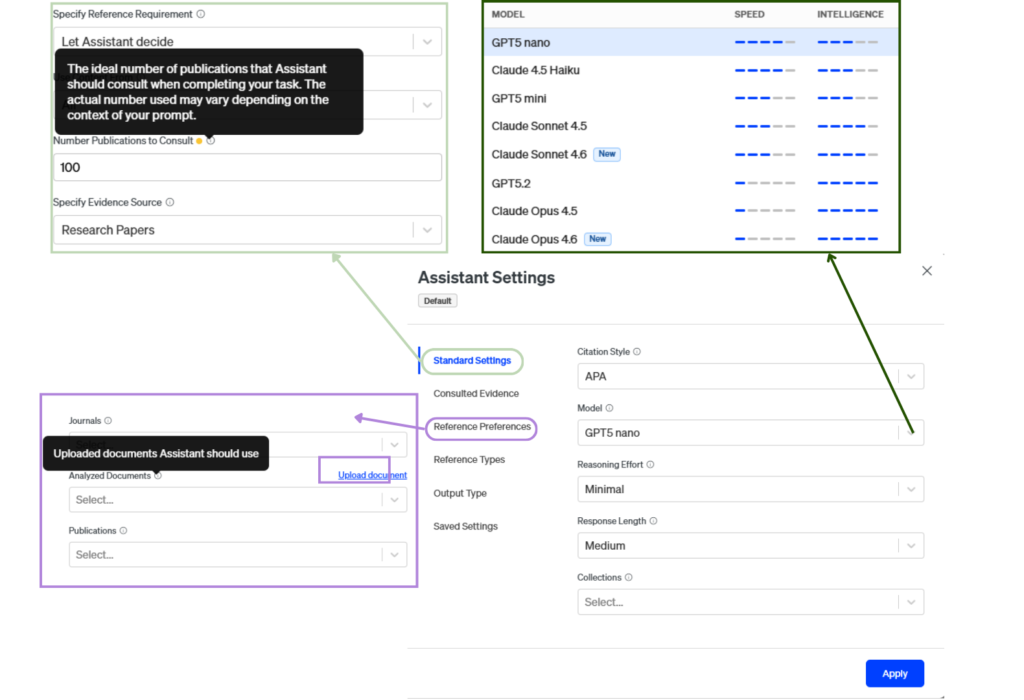
The default reply will be a text summary, typically including an introduction, key statements on the topic, and a conclusion. The settings can be adjusted with the “gear” icon, for example to change the model, indicate number of publications to consult, and filter by publication date and type.
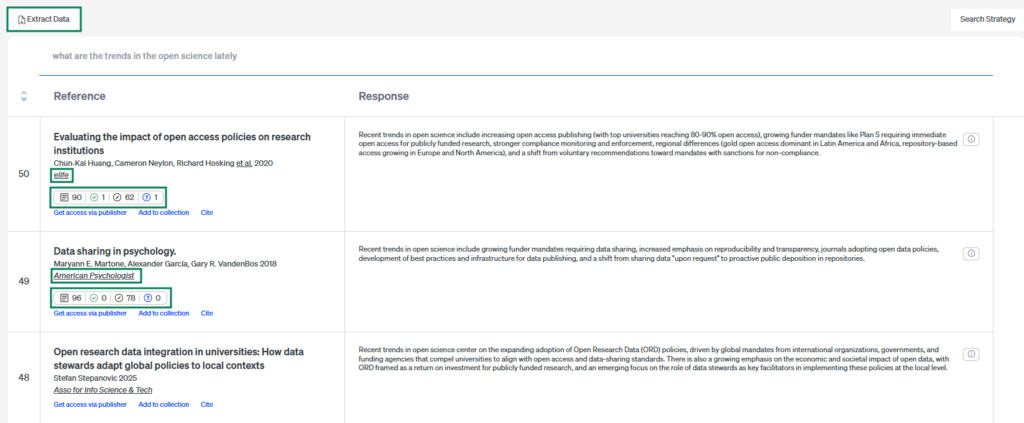
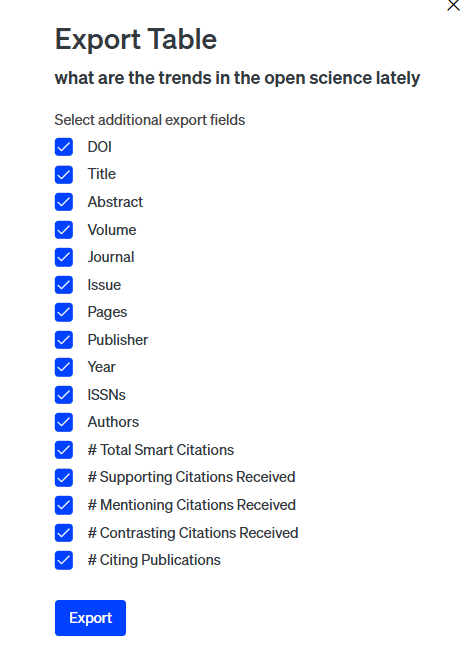
By selecting the “Table Mode”, a list of references will be generated, alongside each reference is a response to the question (Figure 1). Users may click “Extract Data” to download a csv file containing selected fields (Figure 2). After user logging-in the personal account, Scite also displays a badge summarizing the numbers of citing references and classifying citations as supporting, mentioning or contrasting the work. By clicking on the badge, the user will be redirected to the article’s item page.
2: “Fact checks” for relevance
“Fact checks” function is available after users ask questions in chat format (Figure 3). This function is designed to show the Assistant’s behind-the-scenes processes (February 2026 Release Notes, 2026). References considered relevant to the topic are marked as “verified” and are included in generating AI insight. References fetched but considered irrelevant will be marked as “rejected” and excluded from further consideration.
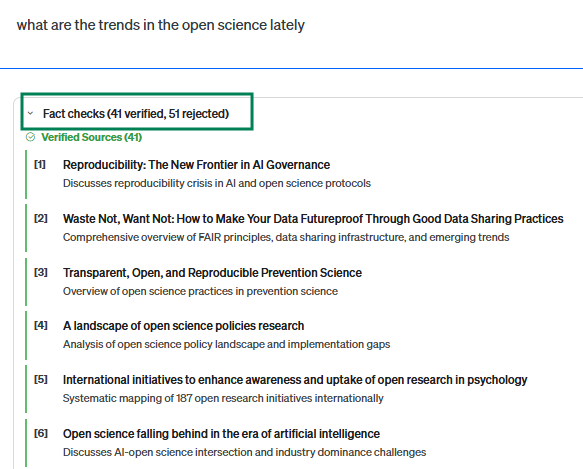
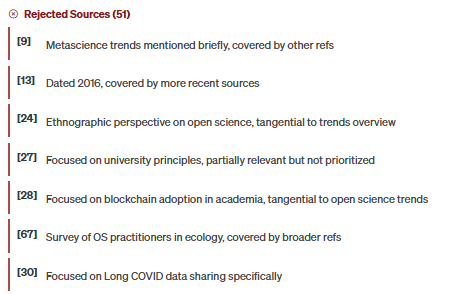
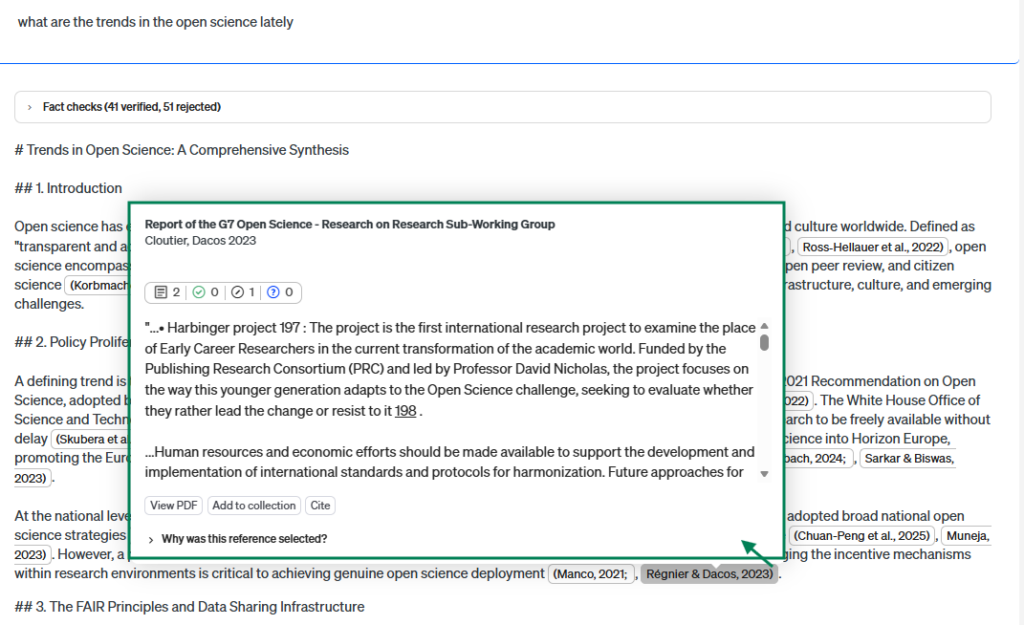
The “Fact checks” list does not provide direct hyperlinks to the articles listed. To inspect the reference used to generate the response, users may hover over the in-text citation to view “Why was this reference selected?” (Figure 4).
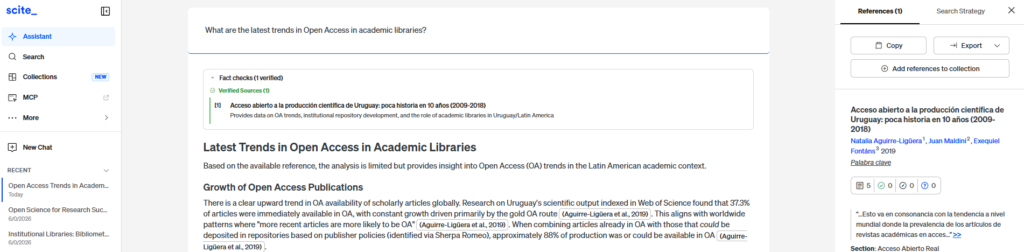
While this function is intended to mitigate hallucination, it does not guarantee the relevance of the retrieved publications to the question asked, nor the relevance between the generated response and the retrieved publications. For example, in a test search related to open access trends in academic libraries, the Assistant could not retrieve relevant sources and claimed that the article “Test–retest reliability for performance-based outcome measures among individuals with arthrogryposis multiplex congenita” provided a general synthesis of open access trends, library roles, policy impact, and infrastructure considerations relevant to current OA developments in academic libraries (Figure 5).
3: Closer look into a specific reference
On the item page, users can see two “summarize” functions. The top one summarizes the selected publication itself. The “Summarize citations” button generates a citation summary based on how subsequent publications have cited the article.
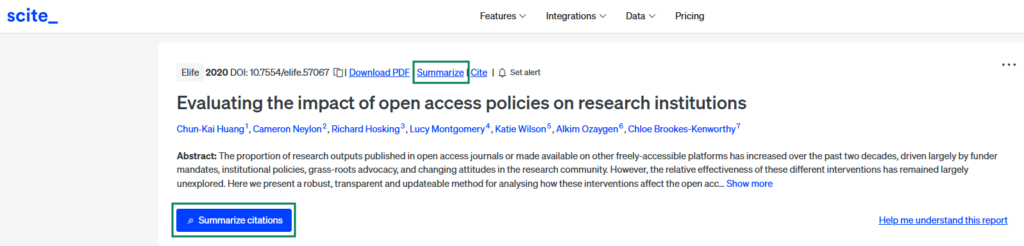
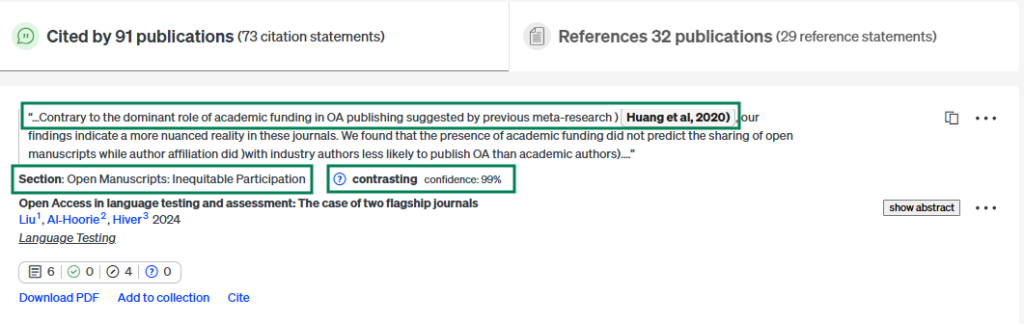
Users can also examine the “Smart Citations” details, including the statement citing the work, the section in which it appears, and the citation types (supporting, mentioning or contrasting). The confidence score is how certain the AI model is about the accuracy of its output.
4: Scite MCP
Scite also provides an MCP (Model Context Protocol) function for users to integrate Scite database with their existing AI-assisted workflows (Scite MCP, n.d.). With Scite connected, users can search the literature, view citation contexts classified as supporting, contrasting, or mentioning, and find related works with their preferred AI tools, such as ChatGPT, Claude, and other AI tools. The database provides access to actual scientific literature in addition to patterns from training data of AI tools. In contrast, the scite.ai platform offers advanced functionalities such as systematic literature search, customizable dashboards, full citation reports, and comprehensive discovery tools.
Strengths and limitations
Data coverage
Despite the ongoing progress of open access movement, a large portion of scholarly contents are still behind the paywall. While the Scite database provides 41.2 million full texts and 2.8 billion citations, Undermind covers 200 million articles (Undermind, n.d.) , and Consensus, over 220 million research papers (Consensus Research Database, n.d.). Nevertheless, users should interpret results with caution, as the Scite database does not provide exhaustive coverage of the scholarly literature.
Scite Assistant incorporates Scite’s “Smart Citations” feature, including classifications of citations to be “supporting, mentioning and contrasting”. It also provides a citation summary and indicates which section of the citing paper contains the cited statement. It presents the qualitative context of citations, instead of displaying solely a citation count (Nicholson et al., 2021). Users, however, should remain aware of the possible limitations in database coverage, metadata quality, and citation-classification accuracy.
Search results
Users should also consider the suitability of the consulted sources for their specific purposes. By default, Scite Assistant includes preprints in the search. For example, in response to the prompt, “What are the trends in the Open Science lately”, one-third of the 28 consulted citations were preprints, as shown in Figure 8. Using preprints itself is not inherently problematic, especially for the research topics which emphasize emerging trends. However, users should be aware that preprints have not undergone formal peer review.
Another example is that when prompted “how can institution libraries provide bibliometrics and research impact services to the higher education sector”, 6 of 15 references had zero citation. This is an example where relevance is prioritized in the default search setting over citations.
To optimize the search for their purposes, users can use the “setting” function to filter for or exclude sources (Figure 9). For example, they can filter for publication types to exclude preprints or other types; They can also change the reference ranking to “Citations” to prioritize works with citations.
Metadata quality
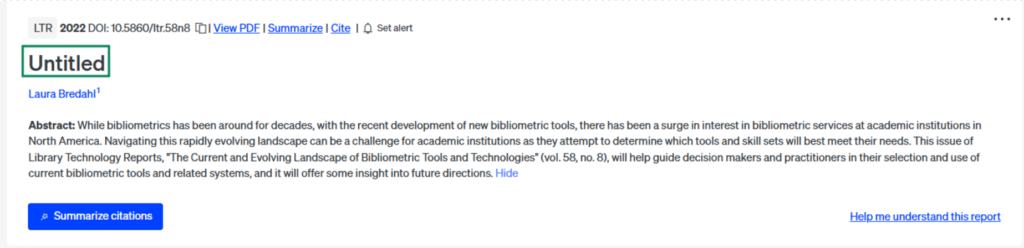
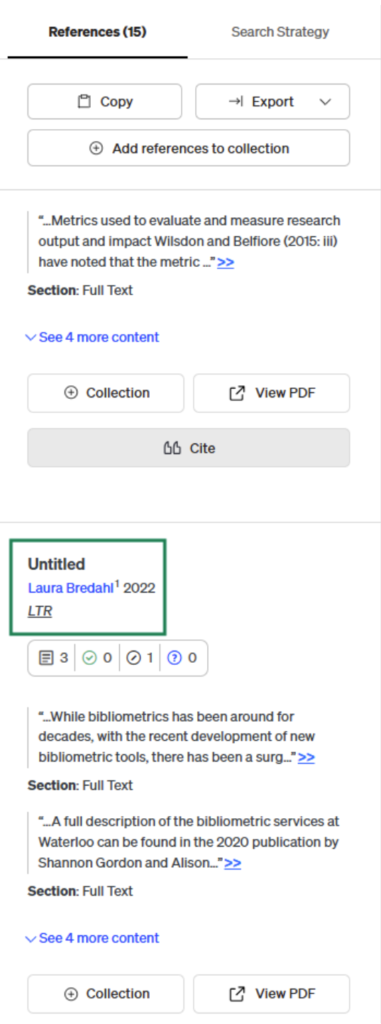
Another search returned a publication showing “Untitled” as title (Figure 10). Though the DOI still effectively leads to a real publication, this metadata issue creates confusion for users.
Conclusion
Scite Assistant can be a handy tool for exploring research topics, identifying relevant literature, and examining citation contexts through Smart Citations. The MCP functionality of Scite also enables users to bring the Scite database into their existing AI-assisted research workflows. However, its outputs should not be treated as definitive. Users should critically evaluate the relevance and quality of the sources consulted and the text generated. They should remain aware of the limitations in database coverage and metadata accuracy, and verify AI-generated summaries against the original publications.
Extended Readings
Reference
Consensus Research Database. (n.d.). Retrieved June 22, 2026, from https://help.consensus.app/en/articles/10055108-consensus-research-database
February 2026 Release Notes. (2026, March 4). scite.ai. Retrieved June 22, 2026, from https://scite.ai/blog/february-2026-release-notes
March 2026 Release notes. (2026, April 7). scite.ai. Retrieved June 22, 2026, from https://scite.ai/blog/march-2026-release-notes
May 2026 Release notes. (2026, June 2). scite.ai. Retrieved June 20, 2026, from https://scite.ai/blog/may-2026-release-notes
Nicholson, J. M., Mordaunt, M., Lopez, P., Uppala, A., Rosati, D., Rodrigues, N. P., Grabitz, P., & Rife, S. C. (2021). scite: A smart citation index that displays the context of citations and classifies their intent using deep learning. Quantitative Science Studies, 2(3), 882–898. https://doi.org/10.1162/qss_a_00146
Scite data and services. (2026, June). scite.ai. Retrieved June 20, 2026, from https://scite.ai/coverage
Scite MCP. (n.d.). scite.ai. Retrieved June 22, 2026, from https://scite.ai/mcp
Undermind. (n.d.). Undermind: your AI co-researcher for the literature. Retrieved June 22, 2026, from https://www.undermind.ai/
Declaration of Generative AI use
I acknowledge the use of Generative AI tools in writing this post. I used:
- Claude.ai, and Gemini to cross-check and verify online information sources.
- Copilot to check grammar.
I declare that I reviewed and edited the contents as needed, and take full responsibility for the contents of the post; And the information provided is complete and accurate.